A site that gets you called, and paperwork that actually gets signed.
Turbo Link Studio builds you a real contractor website, a public booking page that checks your real availability, and token link contracts and change orders with a full signing audit trail. All of it is wired into one dashboard for your leads, jobs, documents and money.
$74 Per month, billed annually One subscription runs the whole Command Center: the site, the booking page, the contracts, the jobs and the money. Month to month is $80, and the website build is priced on its own from $349. See what is included.
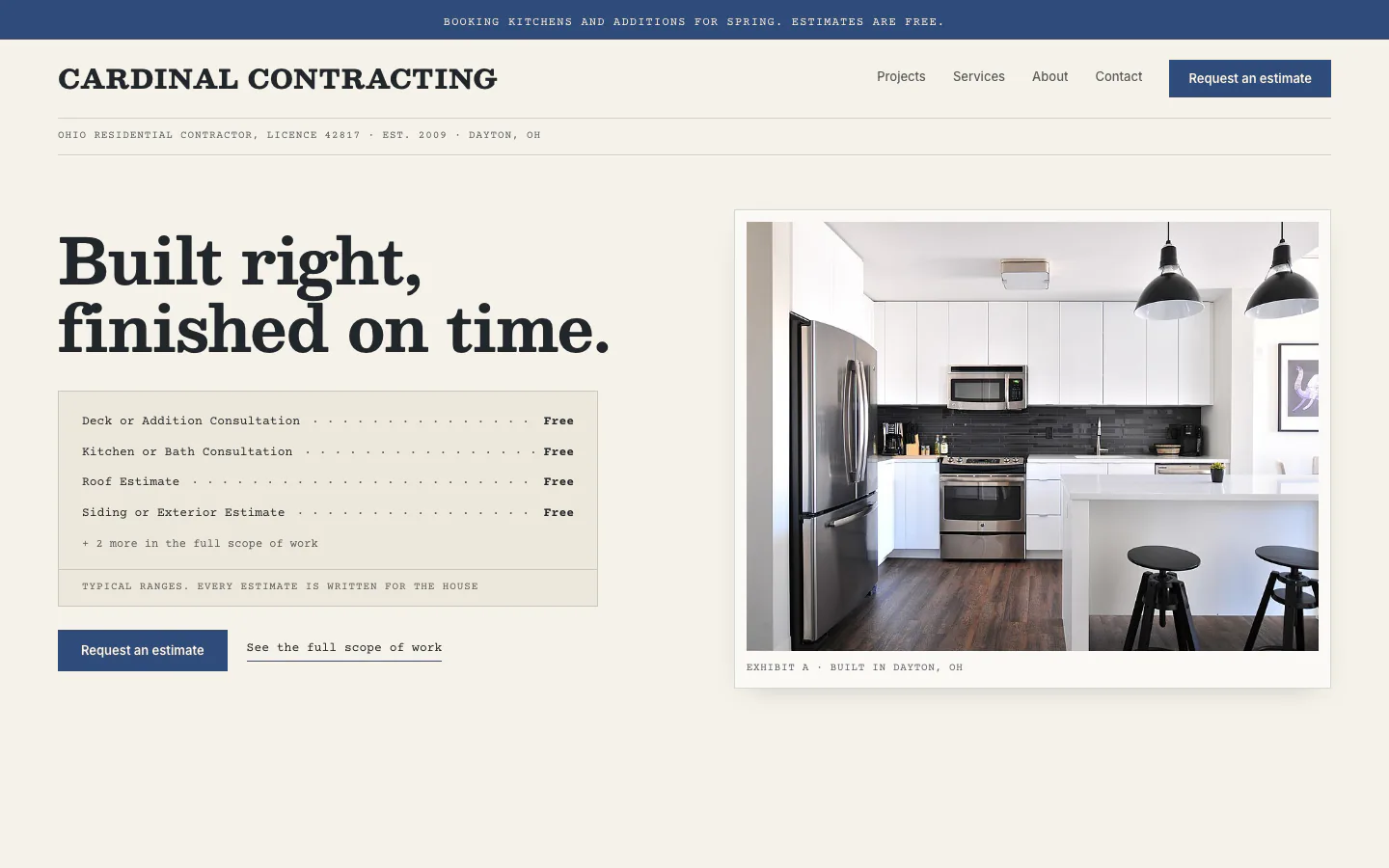
One business, four systems. Open any of them:
The site that gets you called.
A real website, designed and built by a person, with the trust signals a homeowner actually checks before they dial.
- License, bonded and insured, stated plainly. Not buried in a footer nobody scrolls to.
- Your service area, named. The towns and counties you actually work, right on the page.
- Real job photos. Work you have done, not stock art of somebody else's roof.
- Built by a person. A real website project, on your own domain, not a template you assemble yourself. The contractor look is called Keystone: letterhead paper, a priced scope of work, and your jobs mounted as exhibits.
Open the real thing: the Keystone look, running live. Same build a homeowner would land on.
The estimate request, and a calendar that books itself.
A homeowner picks a slot on your booking page, and it actually books. This is the part of the system we tested hardest.
- Real availability, checked live. It reads your actual open slots, not a static calendar.
- It cannot be gamed. A time already taken, or one already in the past, gets rejected.
- A task appears on your side automatically, the moment they confirm, no re-typing a booking off a text.
- The estimate request captures the job details on the same site that has your prices, your license and your reviews.
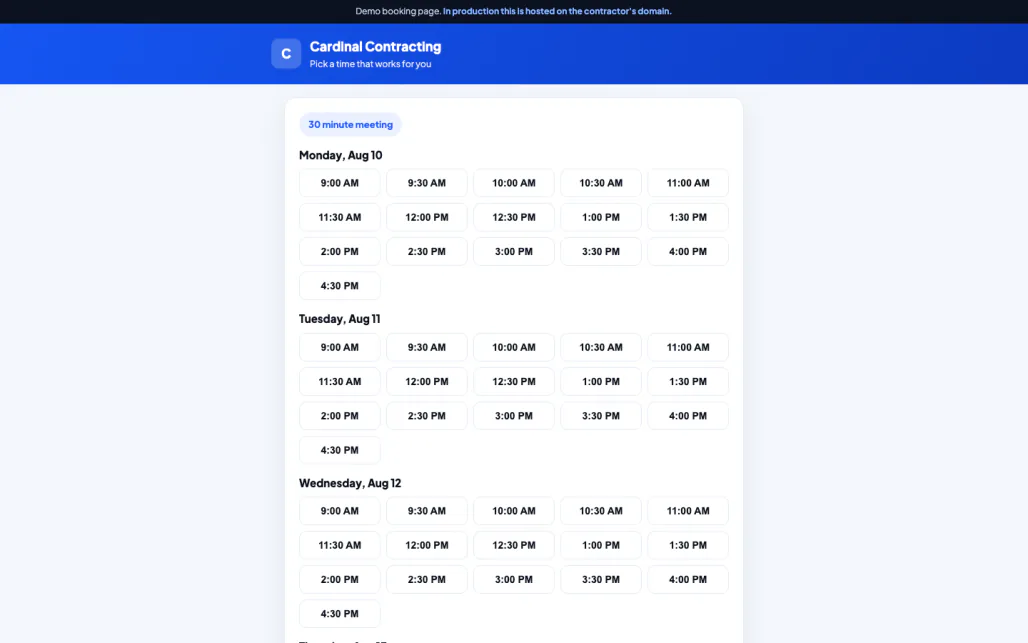
Try it live at booking.html, or the estimate form at estimate.html.
Paperwork that actually gets signed.
An estimate, a contract or a change order goes out as a link. No login, and a real audit trail behind it.
- No account for the homeowner. The link is the whole login.
- Opening it is recorded. A view is marked and timestamped the moment it happens.
- Signing records the real detail. The typed signature, the signer's name and email, the time, the IP address and the browser.
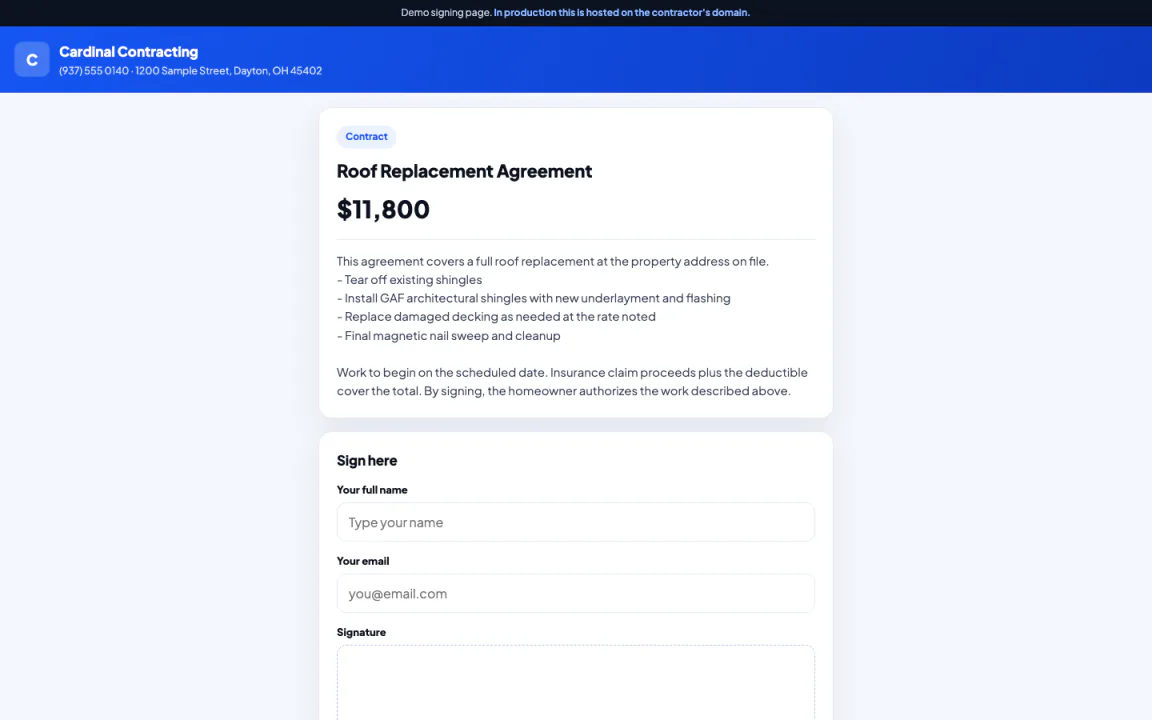
Try the signing demo at sign.html.
One screen for leads, jobs, documents and money.
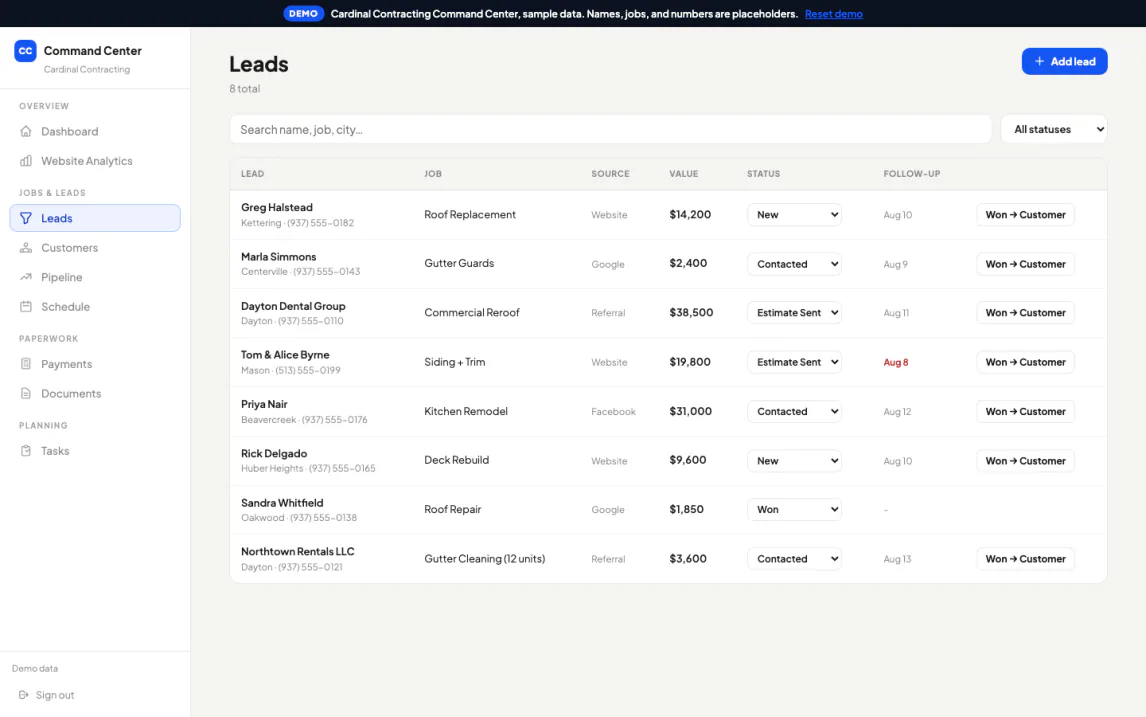
Pipeline, customers, jobs, tasks, documents, company files, outreach, revenue and your site's own analytics, on one login.
- A real sign in. Email and password, with per business isolation, verified: a signed out request returns nothing.
- Job photos and documents, stored in private buckets tied to the job.
- Your site's traffic, form submissions and calls, tracked per day.
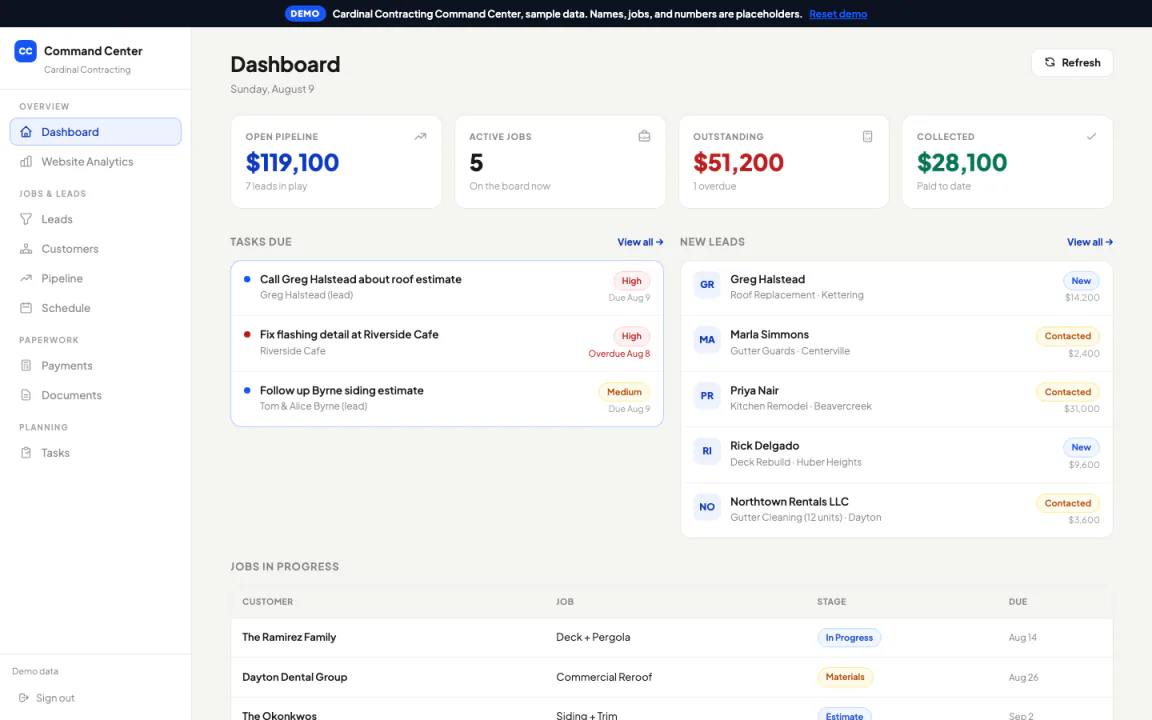
Open the dashboard demo at mission-control-demo.html.
Leads and jobs in one list, instead of in a phone's text messages.
Every lead and job lives in the same record, with the customer's history attached, instead of scattered across texts and voicemail.
- A booking on your site creates a task here automatically. Nothing else does yet, so a phone call or an in person walkthrough still gets added by hand.
- Customers and jobs live together. A repeat call brings up their history instead of starting over.
- One list your whole crew reads. Not a sticky note, not a group text.
What the homeowner never has to do.
A link opens everything, no account needed. If a homeowner wants an easy way back in, they get a portal with nothing to download, or the app on their phone.
- A link that just opens, or a portal and the app if they want one. Booking, estimates, contracts and the after hours form all open from a link, no account required.
- Nothing to download. Every screen opens as a page in the browser they already have, or in the Turbo Link app if they would rather have an icon on their phone.
- Nothing to lose. A token in the link is what gets them in, and only into that one document.
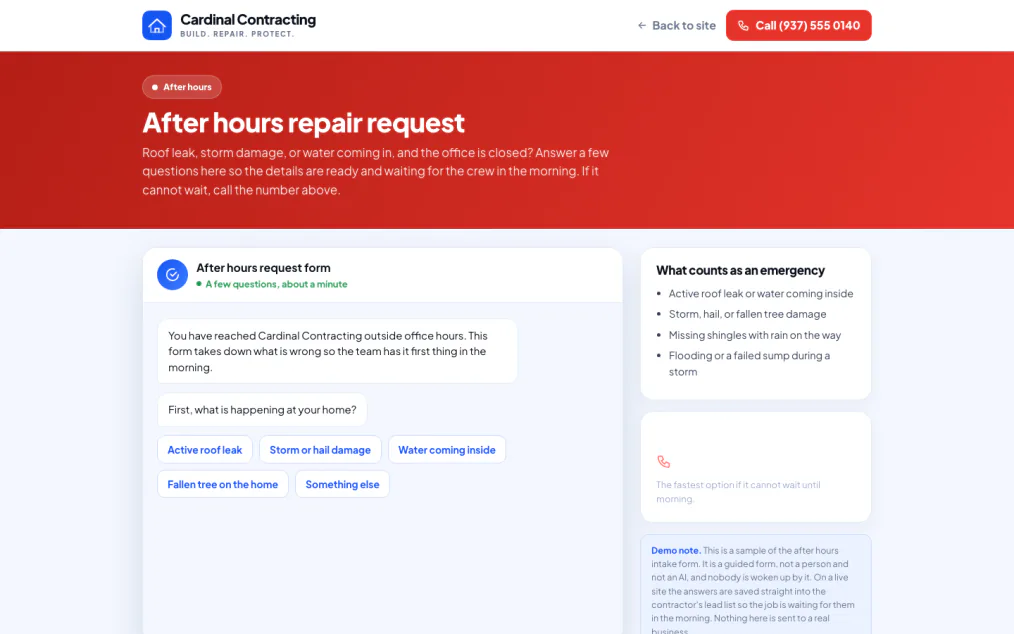
See the client's demo dashboard at contractor-client-demo.html, or the after hours form at emergency.html.
Put a sub on one job, not on your whole business.
Assign the crew working a job to that job. They never see your pipeline, your other customers, or what anything else is worth.
Invite them by email before they have even made an account. They accept or decline and say when they are free. On site they work the same checklist, see what to bring, and talk to the rest of the crew in a thread the homeowner never sees. They sign their own subcontractor agreement. If the company is set up as a team, you record what each one is owed and mark it paid when the job closes; on your own, you settle up outside the app.
Seven switches, set per person and per job. A day laborer sees the address and the checklist and nothing else. Your regular sub sees the customer and the schedule but not the contract value. Your foreman sees all of it.
Retire the tools that do not talk to each other.
Most contractors run a website builder, a separate scheduling link, a separate e-sign tool and a spreadsheet or a whiteboard for jobs, none of which share data with the others. Turbo Link Studio replaces those four with one system, under one roof.
What this does not replace. Your accounting software stays yours, we do not touch it.
We are not a payment processor. The dashboard records that money arrived and how, nothing here charges a card.
No importer. We do not migrate data from Jobber, Housecall Pro or ServiceTitan. Moving over means re-entering your open jobs and customers by hand.
Everything included, one price.
If it is not listed here, it is not part of the subscription.
- A designed contractor website, on your own domain
- Public booking page with live availability
- Estimate, contract and change order documents
- E-signing with a full audit trail
- Leads, pipeline, customers, jobs and tasks
- Subs assigned to a job, with per-person access
- Job photos and company files, in private storage
- A revenue ledger, recording what arrived and how
- Your site's traffic, form submissions and calls, tracked daily
The website build starts at $349, one time. Larger or custom builds are quoted above that.
The revenue ledger records that a payment arrived and how. It does not process a card.
Month to month is $80 and you can cancel whenever you want; there is no contract on the software. The $74 rate is that same subscription billed annually. A contract applies only to the website build or the Premium Marketing add-on below, and only if you choose one.
The whole job, in one list.
The bays above tell the story. This is what is actually inside each system, so you can find the one thing you came here to check.
The website
- Built by a personNot a template kit you assemble.
- Your own domainNot a shared subdomain.
- Trust signalsLicense, bonded and insured, stated on the page.
- Named service areaOn every page, not just the footer.
Leads and estimates
- Estimate request formCaptures the job on your site.
- Public booking pageReal availability, checked live.
- No double bookingsA taken or past slot is rejected.
- Auto-created taskA booking creates a task for you automatically.
Jobs and customers
- One listLeads and jobs together, not scattered across texts.
- Job recordsHold documents and photos against the job.
- Customer historyAttached to the job, not a fresh start each call.
- Private storageJob photos and company files, per business.
Paperwork and signing
- Token linksNo login for the homeowner.
- View trackingOpening a document is timestamped.
- Typed e-signatureName, email, time, IP address and browser recorded.
- Estimates, contracts and change ordersSent as documents, not paper.
Money
- A revenue ledgerRecords that a payment arrived and how.
- Not a payment processorNothing here charges a card.
- Job level totalsTied to the job record.
- Website build starts at $349Never bundled into the software price.
What the client sees
- A link that just opensOr a portal and the app if they want one.
- Portal or appWhichever they prefer, same thing inside.
- The after hours formA guided form, not a person or an AI.
- Token access onlyThe link is the whole login.
The questions we get
Straight answers, before you have to ask.
I already pay for Jobber or Housecall Pro. Can you import my data?
Is there a mobile app?
Do you take card payments for me?
What actually happens after hours?
Do my customers have to create an account?
What do I own, and what does the build cost?
Is there a contract?
What happens if I stop paying?
Who owns the domain?
Get your site built, and your job wired to one dashboard.
$74 a month, billed annually, $80 month to month. The website build starts at $349, one time.