A barber CRM with cut notes and rebooking
Keep every client's cut on record, see who is due back and bring them in before they drift to another shop.


Cut notes for every client
Save each client's guard numbers, fade type, beard length, part and lineup on their record. Any barber in the shop can give a regular the same cut.

The cut, written down
Each client's record has fields made for barbers: guard numbers, fade type, beard length, and part and lineup notes. Fill them in once after the first cut and update them when the style changes. A regular never has to explain his fade again.
On hand before the chair
The notes sit on the client's record, so any barber can check them before the client sits down. When a regular's barber is off, another barber can still give him the cut he expects. The client stays with the shop instead of waiting for one chair.
Visit history
Every cut, who did it and what it cost, on each client's record. You know a client before they say a word.
Lifetime spend
See what each client has spent with the shop. You know who your best regulars are.
Birthdays
Keep each client's birthday on file. A birthday email goes out on its own.
Rebook cycles and rebook emails
Set how often each client should be back: every 4, 6, 8 or 12 weeks. When a client is due, they land on your Due a rebook list, and a rebook email goes out in your words.


A cycle for each client
A skin fade grows out faster than a scissor cut, so each client gets their own rebook cycle. Pick every 4, 6, 8 or 12 weeks on their record. Turbo Link counts from their last visit and knows when they are due.
Rebook emails in your words
When a client is due, a rebook email goes out with your booking link. Write it once in your own voice. Clients who already like your cuts book again instead of trying the shop down the street.
Due a rebook
See every client who is due for their next cut. You know who to invite back today.
Next cut on the record
Each client's next booked cut shows on the client list. You see who is already on the book.
Client lists for barbershops
Filter your clients by who is due a rebook, who is overdue and whose birthday is this month. Find the clients who have not been in for 30, 60 or 90 days.

Who has drifted
See the clients not seen in 30, 60 or 90 days, each with their barber, last visit and lifetime spend. A regular who has gone quiet shows up before he becomes a stranger. You choose who is worth a personal note.
Search and sort
Search any client by name and see their barber, next cut and last visit at a glance. Open a record for their cut notes and full history. Every client the shop has ever cut is a few taps away.
Overdue
Clients past their rebook cycle show on their own list. Nobody slips through.
Birthdays this month
See whose birthday is coming up. It is an easy reason to reach out.
Client messaging: texts and list emails
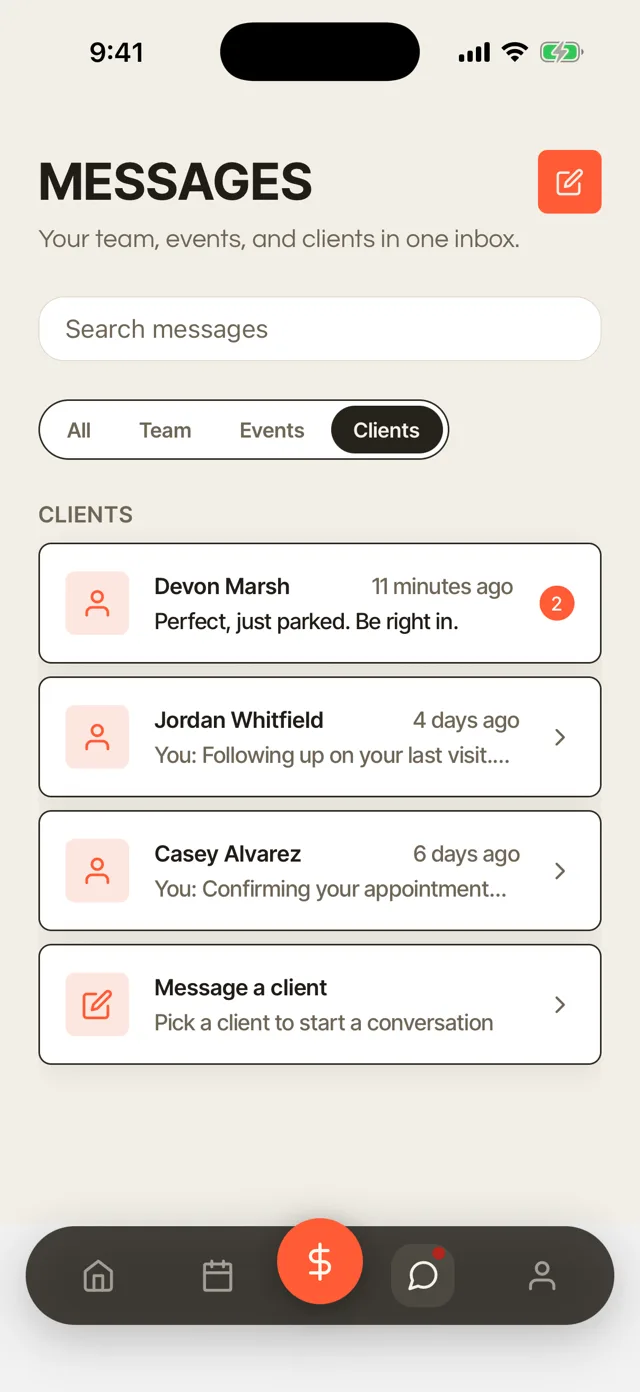
Text clients one to one, with their replies back in one inbox, and email a whole list at once, such as everyone due a rebook or everyone not seen in 60 days.

Two-way texts
Text a client from the dashboard or the app, and their reply lands back in the same thread. A regular running late or asking for a shorter cut gets an answer between cuts. The conversation stays with the shop instead of on one barber's phone.
Email a whole list
Pick a list and write the email once. It goes to every client on the list who agreed to hear from you, and you see that count before you send. An open Tuesday afternoon can fill from one send to the clients who are due.
Birthday emails
Birthday emails go out on their own. A small touch that brings regulars back.
Automatic messages
Confirmations, reminders and follow-ups go out in your words. You write them once.
Import your clients from a CSV file
Export your client list from your old app as a CSV file and import it yourself. Moving to Turbo Link does not mean starting your book over.
Bring your clients with you
If your current app lets you export your clients as a CSV file, import that file into Turbo Link. Each client comes in with their name, phone, email, birthday and notes. Visit history, upcoming appointments and saved cards stay in your old app. Add cut notes and rebook cycles as each regular comes back in.
Take them with you anytime
Export your client list as a CSV file whenever you want. Your clients are yours, not ours.
More of Turbo Link for barbers



Questions barbers ask
What does a barber CRM do?
It keeps a record of every client: their cut notes, their visits, what they spent and when they are due back. Turbo Link uses that record to send rebook emails and build lists of who to invite back.
Can I import my clients from Booksy or Squire?
Yes, if your current app lets you export your client list as a CSV file. Import it into Turbo Link yourself, and each client comes in with their name, phone, email, birthday and notes. Visit history, upcoming appointments and saved cards stay in your old app. Compare Turbo Link and Booksy or Turbo Link and Squire.
Do rebook reminders go out by text?
Rebook messages go out by email, with your booking link. Appointment reminders go out by email and text 48 hours before a cut.
Can booth renters keep their own clients?
Yes. On Team, each renter's book and client list stay private. The owner sees totals and rent, never a renter's clients.
Bring your regulars back on time
Import your clients and set your rebook cycles yourself. You add a card to start, and you are not charged today.