Barbershop booking, walk-in queue and payments
Regulars book online and walk-ins join the queue, with a wait time that comes from your real service times. Run the shop from the dashboard and the Turbo Link app on your iPhone or Android phone.

Online booking for barbershops
Clients book a cut from your own booking link: they pick a service, a barber and an open time. The appointment lands in your book with the barber and the price, so you are not taking bookings by text between cuts.


Your own booking link
Put your link on your website, in your Instagram bio and in your texts, and clients book from their phone. They choose a service from your menu, pick their barber or take the first available, and choose an open time. A time already booked with a barber never shows as open, so two clients never land in the same chair at once. Regulars rebook themselves while you keep cutting.
Reminders by email and text
Clients get a reminder by email and text 48 hours before their cut, and you can change the timing. They text back C to confirm. A client who cannot make it has time to cancel or reschedule. The chair goes to someone else instead of sitting empty.
Your service menu
List each service with its time and price, starting from a barber menu of cuts, skin fades, cut and beard, lineups and hot towel shaves. Clients see what a cut costs before they book.
Any barber or first available
Clients pick their barber or take the first open chair. Regulars stay with their barber, and new clients get in sooner.
Waitlist
When a cut is canceled, the opening goes to your waitlist by email and text. A canceled slot can still end up a paid cut.
Google and Outlook calendar sync
Your bookings sync both ways with Google or Outlook calendar. Every cut shows on the calendar you already check.
Walk-in queue and self check-in
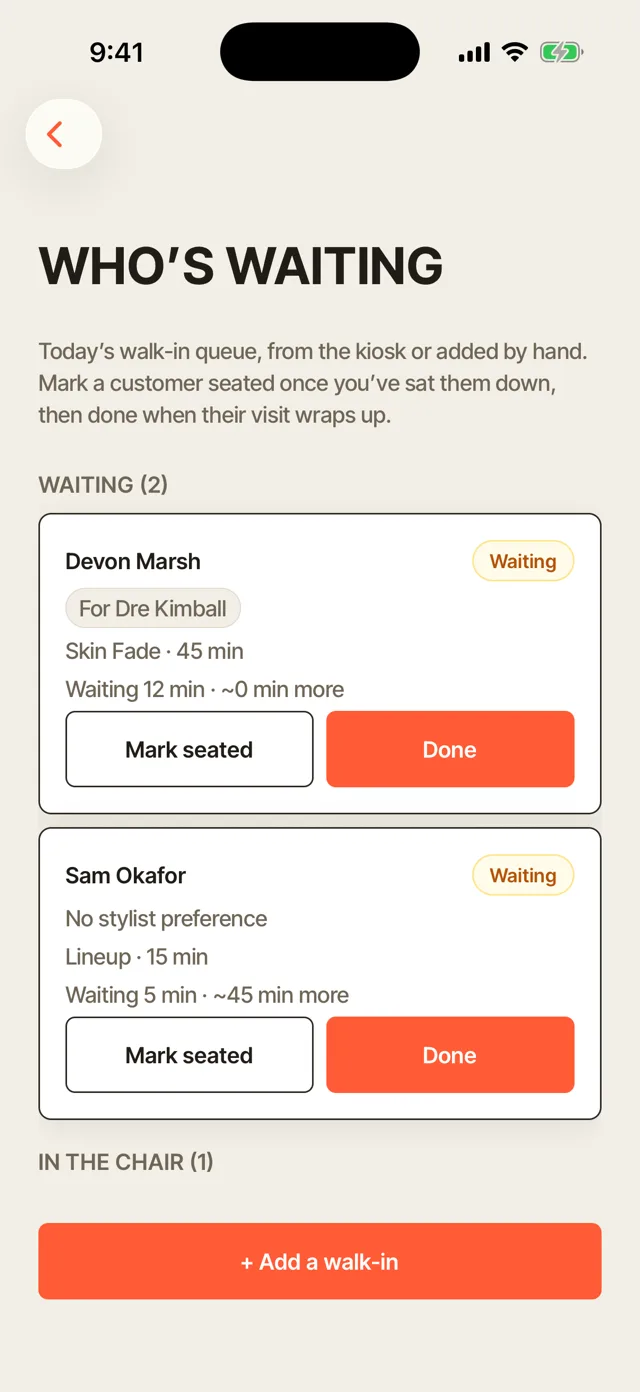
Walk-ins sign themselves in on an iPad at the door, or the front desk adds them, and they join the queue. Each walk-in sees their place in line and a live wait on their phone. Every barber sees who is next on the dashboard and in the app, so nobody gets skipped.


Self check-in iPad
Set an iPad by the door, and walk-ins check themselves in. New clients type their name, and regulars find themselves by name and the last four digits of their phone. Each one picks the barber they came to see or takes no preference, then lands in your queue. The iPad needs your PIN to leave check-in, so nobody wanders into the rest of the shop's account.
Place in line and live wait
Once they are in the queue, walk-ins follow their place in line and a live wait on their phone. The wait comes from the services ahead of them and the barbers cutting, and it updates as the line moves. A client who can see the wait steps out for a coffee and comes back on time, instead of walking out.
The same wait at the front desk
When someone at the door asks how long the wait is, you read the same number off the screen.
Add a walk-in in seconds
Type a name and pick the service and the barber they came to see. The walk-in is in line before they find a seat.
Waiting and In the chair
Mark a walk-in seated when they sit down, and Done when the cut wraps up. The whole shop sees who is waiting and who is in a chair.
Chair hours
See each chair's booked hours against its open hours for the last seven days. You can tell which chair runs slow and which days need another barber.
No-show fees and deposits
Take a deposit or save a card when clients book, and charge a no-show fee to that card when someone does not show. Your cancellation policy sits on the booking page, so clients agree to it before they book.

Deposits on booking
Set a deposit as a percentage of the price for each service. Clients pay it as part of booking. A client who has paid to hold the chair is far more likely to show up. Your Saturday morning is protected before the day starts.
No-show fee to the card on file
When a client does not show, mark the appointment a no-show and charge the fee to the card they saved at booking. The fee is half the service price unless you set your own. You get paid for the chair you held instead of chasing the client by text.
Your cancellation policy
Write your policy once, and it shows on the booking page. Clients know the rules before they book, so a fee never comes as a surprise.
Card at booking
Ask for a card at booking from new clients only, or from everyone. You choose how strict to be.
Barbershop POS: checkout, tips and Tap to Pay
Check out a client from their appointment, add a tip and take the card at the chair. The money goes to your own Stripe or Square account, and the receipt goes out for you.

Tips at checkout
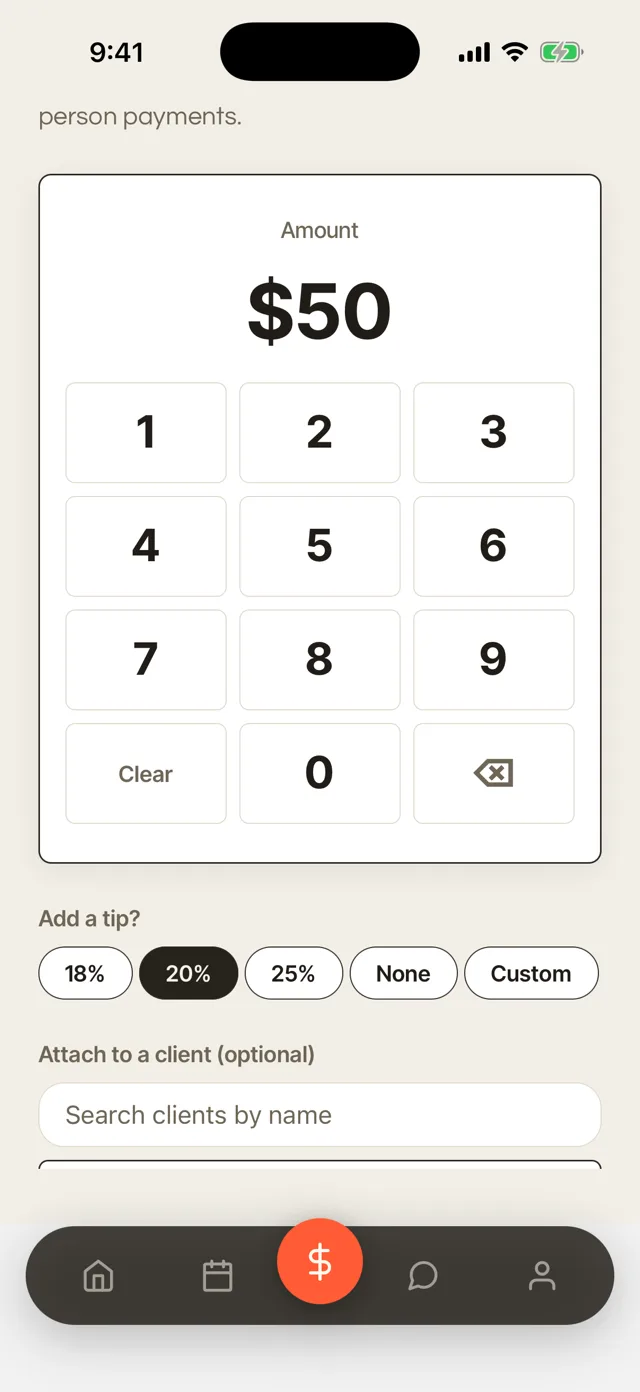
Clients choose a tip of 18, 20 or 25 percent, no tip or a custom amount. The tip is recorded with the cut, so each barber's tips add up on their own. Nobody has to work out a percentage in their head at the counter.
Tap to Pay on iPhone
Take a card in person with just your iPhone, with no card reader. Hold out your phone, and the client taps their card or their phone to pay. It works at the chair, so the client pays without walking to the front. The money goes to your own account like any other payment.
Checkout from the appointment
Open the appointment and the service and price are already there. Checkout takes seconds while the next client sits down.
Pay links and card on file
Send a pay link by text or email, or charge a saved card. Clients can pay even after they have left the shop.
Products on the same ticket
Add pomade, beard oil or anything you sell to the cut. One payment covers the whole visit.
Receipts sent for you
Clients get a receipt by email as soon as they pay. Their past visits and receipts stay in their portal.
Paid to your own account
Money goes to your own Stripe or Square account. You keep your own payment history and payouts.
Your week at a glance
See collected this week, tips and average ticket on the dashboard. You know how the week went without a spreadsheet.
Barber CRM: cut notes and rebooking
Keep cut notes on every client and see who is due back for their next cut. Any barber can give a regular the same cut, and the clients who drift away get a reason to come back.


Cut notes
Save each client's guard numbers, fade type, beard length, part and lineup on their record. The notes sit on the client's record, so any barber can check them before the client sits down. A regular never has to explain his fade again, even with a barber he has not sat with before.
Rebook cycles and rebook emails
Set a rebook cycle for each client: every 4, 6, 8 or 12 weeks. When a client is due, they land on your Due a rebook list, and a rebook email goes out in your words. Your quiet Tuesday fills with clients who already like your cuts.
Visit history
Every cut, who did it and what it cost, on each client's record. You know a client before they say a word.
Lists of who to reach
See Due a rebook, and clients not seen in 30, 60 or 90 days. You know exactly who to invite back.
Email a list at once
Send one email to a whole list, and birthday emails go out on their own. An open afternoon can fill from one send.
Booth rent and commission tracking
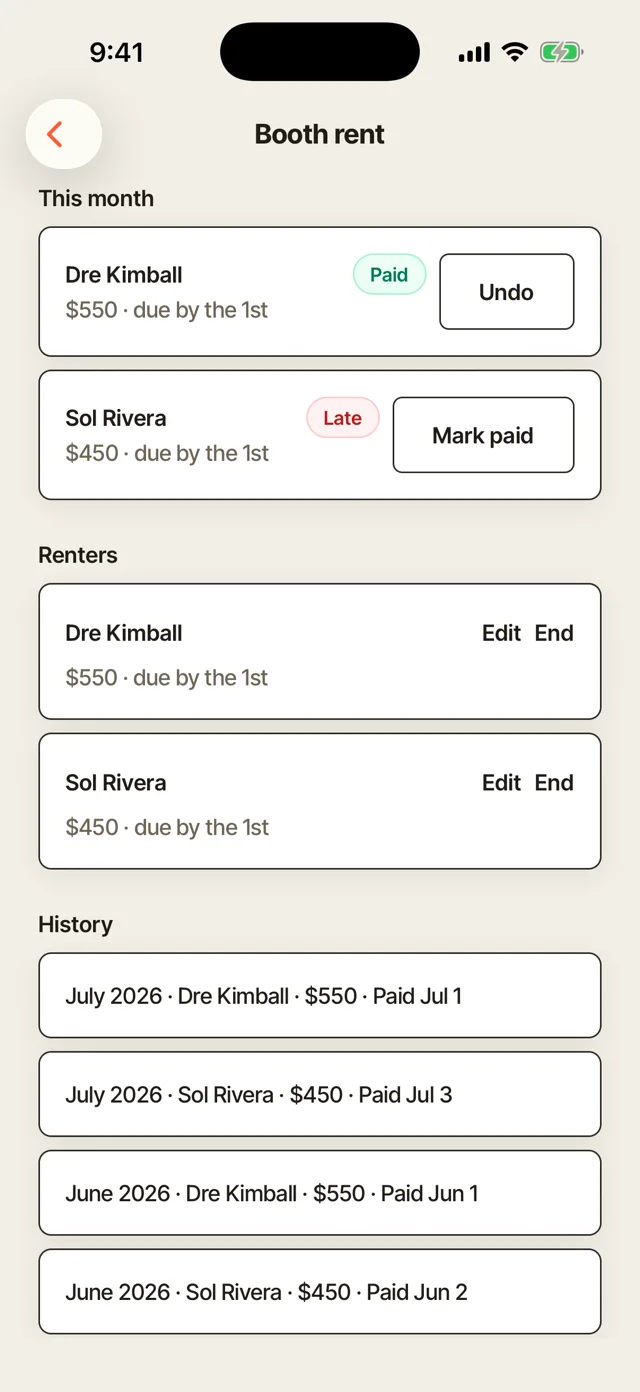
Track each renter's rent and when it is due, with every payment marked Paid, Due or Late. Commission shops see what they owe each barber, with each barber's tips tracked.

Booth rent tracking
Set each renter's rent and the day it is due. The dashboard shows who has paid, who is due and who is late, with the on-time rate for the month. Until a renter pays, a reminder goes out each week, and you mark the rent paid when it comes in. You stop chasing rent in a group chat.
Commission and tips per barber
For barbers on commission, see what you owe each one for the period. Tips are tracked per barber, so you can pay each one in full. The team dashboard shows each barber's tips, so payday has no arguments.
Booth Rent Agreement
Send the Booth Rent Agreement template, and your renter signs it in the app. The terms are settled in writing before they cut a single client.
Renters keep their clients private
On Team, each renter's book and client list stay private unless they choose to share. You see totals and rent.
Barbershop website template
Your shop gets a website in the Poster design, with your prices and booking built in. Visitors see your cuts and prices and book from any page.
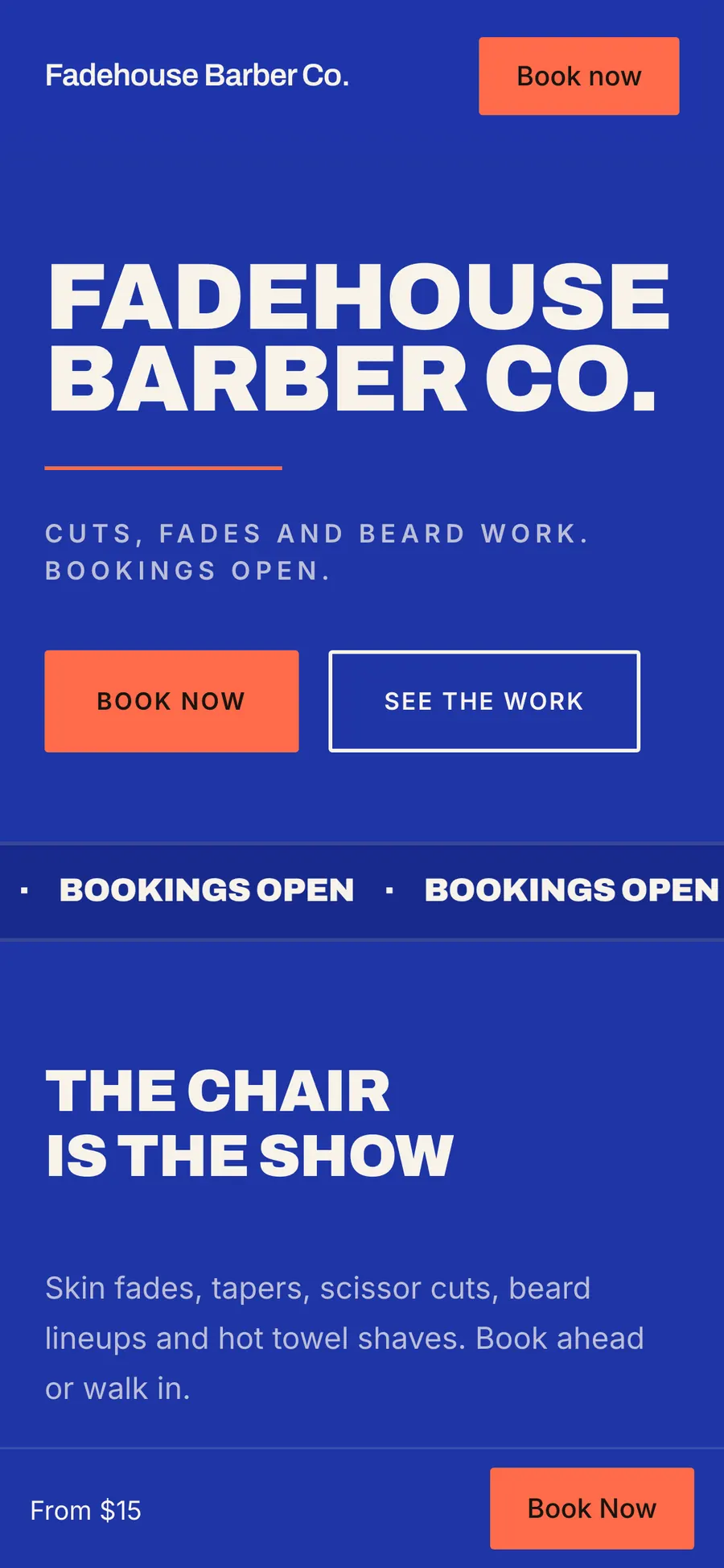
Poster, made for barbershops
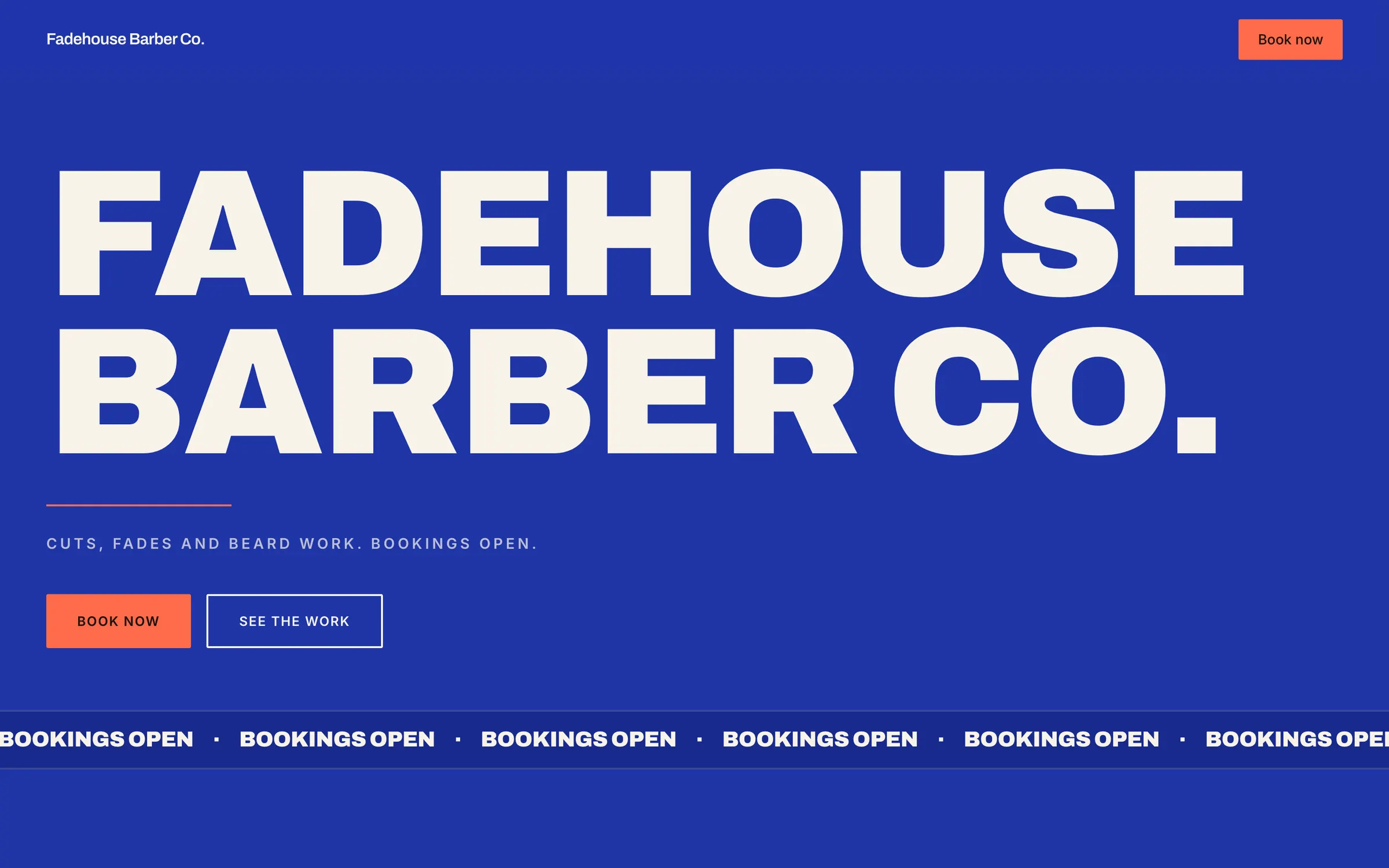
Poster sets your shop's name in big, bold type, with a moving banner and big prices. It reads as well on a phone as on a laptop. Clients who tap your link from Instagram land on a site that looks like a barbershop.
Prices and booking from your menu
Your prices come straight from your service menu, so the site and the booking page always match. Every page carries a Book now button. Change a price once, and the site updates with it.
Your own domain
Your site runs on your own domain, registered in your name. If you leave, you take it with you.
Search titles and a sitemap
Write your page titles and descriptions, and your sitemap is made for you. People searching for a barber near them can find your shop.
Edit from anywhere
Change your site from the web or from your phone. Make a change between cuts.
Barber app for iPhone and Android
Run the shop from your phone: the book, the walk-in queue, checkout and messages. The app uses the same account as your dashboard, so the shop is the same on both.
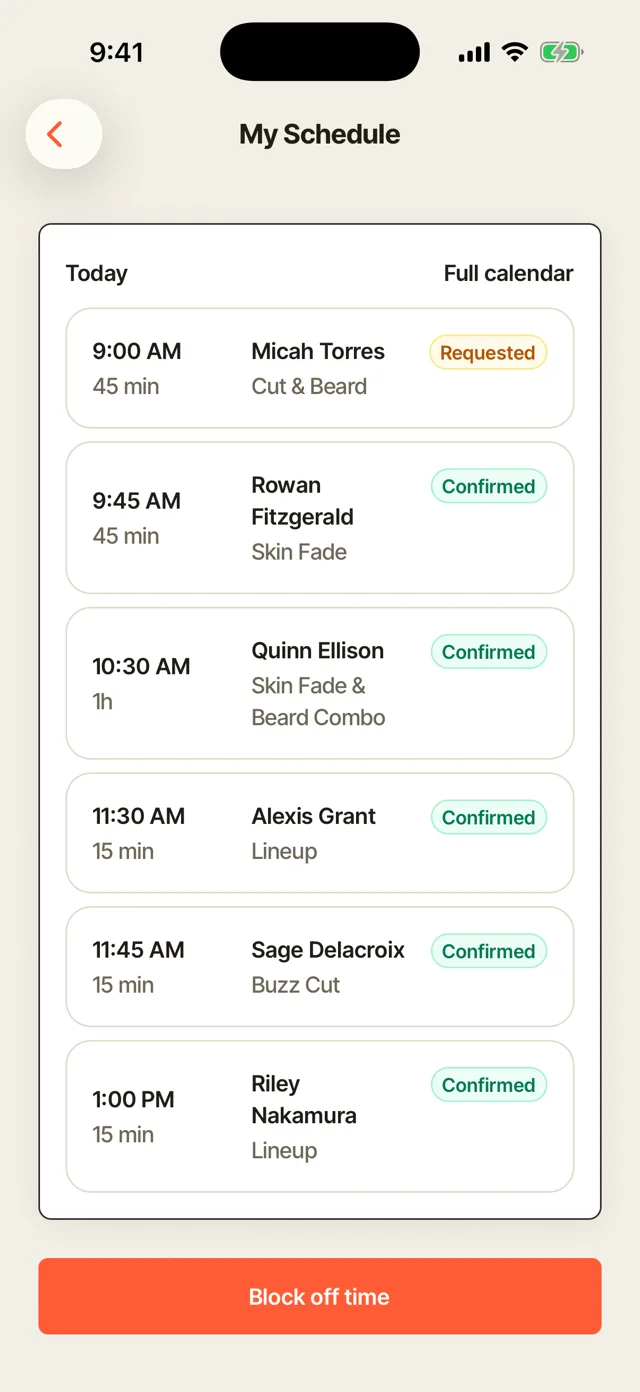
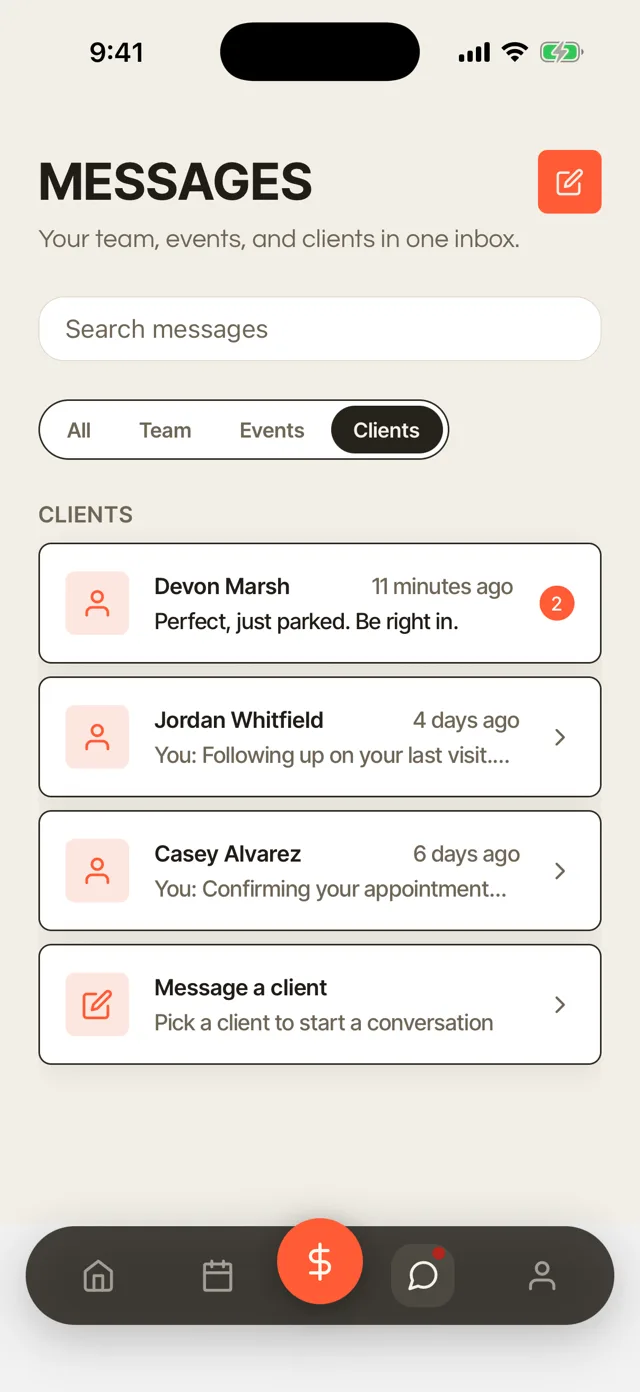
Your book and the queue
See your day of appointments, add a walk-in and move the queue along from your phone. Mark a walk-in seated and Done without walking to the front desk. Every barber can see their own day from their own phone.
Messages
Reply to clients and your team from one inbox. A client running late or asking for a shorter cut gets an answer between cuts.
Checkout and Tap to Pay
Key in the amount, add the tip and take the card with Tap to Pay on iPhone. Clients pay at the chair.
Booth rent
See each renter's rent and mark it paid from your phone. Rent never waits until you are back at a laptop.
Block off time
Block off time for lunch or an errand from the app. Clients cannot book the time you blocked.
More features for barbers
Client portal
Clients see their appointments, receipts and documents in one place. They sign in with a link sent to their email, with no password to remember.
Two-way texts
Text clients from the dashboard, and their replies come back to you. You answer from one place instead of your personal phone.
Automatic messages
Confirmations, reminders and follow-ups go out in your own words. You write them once, and they send on time.
Team accounts
Give each barber their own sign-in, with permissions you choose. Nobody has to share your password.
Products and inventory
Sell pomade, beard oil and anything else you stock, and track how much is left. You know when to reorder.
Straight-razor shave consent
Clients sign a consent form for a straight-razor shave on their phone. The signed form stays on their record.
Expenses
Log shop spend with a photo of the receipt, by barber and by category. You see where the money goes each month.
CSV import and export
Bring your client list in from a CSV file, and take it with you anytime. Moving to Turbo Link does not mean starting your book over.
Social Studio
A paid add-on for planning and posting to your social accounts. Add it whenever you are ready.
What the Solo plan costs
Solo
Barbershops$29a month, billed annually
or $35 a month, month to month
- Team for a shop of up to nine, renters included, $89 a month billed annually
- Card payments at 2.9% + 15¢
- Instant payout at 1.5%, only when you want it
- Month to month, cancel any time
Questions barbers ask
Can I switch from Booksy or Squire?
Yes, if your current app lets you export your client list as a CSV file. Import it into Turbo Link yourself, and each client comes in with their name, phone, email, birthday and notes. Visit history, upcoming appointments and saved cards stay in your old app, so ask regulars to book their next cut on your new link. Set up your services, prices and barbers, then share that link. Compare Turbo Link and Booksy or Turbo Link and Squire.
What is a fair no-show fee for a barbershop?
Many shops charge half the service price, which is where Turbo Link starts, and you can set your own. Put the policy on your booking page so clients agree to it before they book, then charge the fee to the card they saved. Read how to write a no-show fee policy.
Booth rent or commission: can Turbo Link track both?
Yes. Renters get their rent amount and due day, marked Paid, Due or Late, with weekly reminders until it is paid. Commission barbers see what they are owed, with their tips tracked so you can pay them in full. A shop with both can run them side by side. Read about booth rent and commission.
Do I need a separate check-in app for walk-ins?
No. The walk-in queue and the self check-in iPad are part of Turbo Link. Walk-ins sign in at the door, join the queue and follow their place in line and a live wait on their phone. They show up on the dashboard and in the app. Read about walk-in queue apps.
How do booth renters work on Team?
Each renter is one of the nine people on Team. A renter's book and client list stay private unless they choose to share, and you see totals and rent. When a renter takes a card payment, the money goes to the renter's own payout account, not the shop's. If a renter leaves, their clients go with them.
Do booked appointments count in the walk-in wait?
No. The wait estimate adds up the service times of the walk-ins ahead and spreads them across the barbers cutting. Booked appointments stay on each barber's book, and every walk-in picks a barber or takes whoever is free first, so a barber with a booking coming up can leave the next walk-in to someone else.
What does Turbo Link cost for a barbershop?
Solo is $29 a month billed annually, or $35 a month, month to month. A shop of up to nine is $89 a month billed annually on Team, with no per-seat charge. Card payments are 2.9% + 15¢. See pricing.
Is there a contract?
Not on the software. It is month to month, and you can cancel any time. A contract applies only to a custom site build or the Premium Marketing add-on, if you choose one.
Move your shop to Turbo Link this week
Import your client list from a CSV file, set up your booking page and your queue, and share your link. Solo is $29 a month billed annually, and Team covers a shop of up to nine with no per-seat charge. You add a card to start and are not charged today. Cancel before your trial ends and you pay nothing.